Employee Spotlight: Carla Bradshaw
Published on September 18, 2026
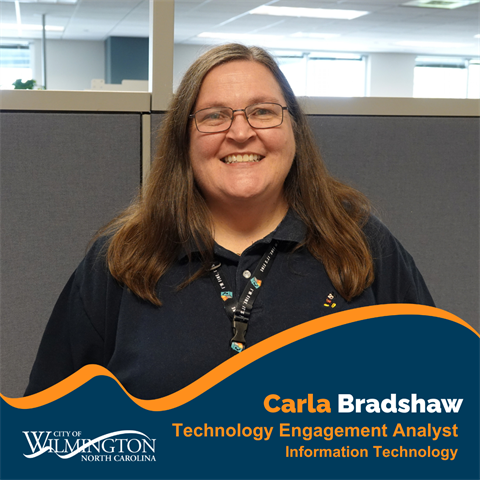
Name: Carla Bradshaw
Job Title: Technology Engagement Analyst
Department: IT – Technology Engagement Division
Years with the City: 16 years
More Than Fixing Computers
When many people think about IT, they may picture someone troubleshooting a computer, fixing a broken device, or helping an employee log into a system.
For Carla Bradshaw, there is much more to the job.
As a Technology Engagement Analyst, Carla’s work focuses largely on managing employee technology accounts, permissions, and equipment across the City. She also manages technology assets and inventory, supports public records requests, and works with departments to make sure employees have the technology they need to do their jobs.
Carla’s team is separate from the IT Help Desk, which handles employees’ day-to-day technology troubleshooting and break/fix needs. When the Help Desk encounters an issue that requires additional support, it may be escalated to Carla’s team.
Instead, Carla’s work includes setting up accounts and permissions for new employees, managing email addresses, providing access to shared drives and distribution lists, and terminating accounts when employees leave the City.
That behind-the-scenes work has become especially important as employees move between departments and positions and need access to different systems.
Keeping Track of More Than 1,500 Devices
One of Carla’s biggest responsibilities is asset management — keeping track of the technology employees use every day.
Her team manages more than 1,500 devices, including laptops and iPads, throughout the City. That number does not include servers or cell phones.
Every device has a history that needs to be tracked, including its make and model, purchase date, warranty information, budget, replacement date, and much more.
Most laptops are replaced every five years, while desktops typically have a six-year replacement cycle.
Carla’s team also works with departments to make sure employees have the equipment they need. Standard equipment can be ordered through the City's purchasing process, while departments such as Police and Fire may require specialized equipment based on the nature of their work.
When an employee leaves the City, Carla’s team tracks down the associated equipment and makes sure it remains with the City. When a new employee arrives, the process works in reverse — the team helps make sure the employee has the appropriate device, account, and access to get started.
From computers and monitors to keyboards, phones, headsets and mice, much of the technology employees use at their desks passes through Carla’s team at some point.
Behind the Scenes of the Skyline Move
One of the projects Carla is most proud of was helping prepare Skyline Center for employees moving into the building.
The move took place shortly after the COVID-19 pandemic, when many employees were still working remotely. At the same time, departments were preparing to move into Skyline, creating a long list of technology needs.
Carla and her team had to make sure the network was ready, computers and other equipment were in place, and devices were properly tracked as employees and departments moved into their new spaces.
“There were a lot of moving parts,” Carla said.
The project required coordination, planning, and careful tracking to make sure employees could walk into their new workspace and have the technology they needed to do their jobs.
Supporting Public Records Requests
Carla’s work also extends beyond internal technology needs.
Her team assists the City Clerk’s Office and City Attorney’s Office with public records requests that involve employee email communications. When a request involves emails, Carla’s team can run queries and keyword searches to help identify relevant records.
The work may happen behind the scenes, but it supports the City's ability to respond to public records requests and provide information to the community.
Technology That Supports City Services
Although Carla does not typically work directly with residents, the technology her team manages supports employees who do.
That includes field employees who rely on laptops, tablets, and other devices to perform their work outside of a traditional office setting.
Making sure those employees have the equipment they need helps them do their jobs efficiently and ultimately supports the services residents rely on.
“We keep the City running,” Carla said.
Advice for Future City Employees
For anyone interested in a career with the City, Carla recommends starting with the job description.
Her advice is to look closely at what the position requires and tailor the application to demonstrate how your experience matches those qualifications.
“This helps to get through the first layer of application reviews and get in front of the hiring manager,” she said.
A Christmas Collection 40 Years in the Making
Outside of work, Carla has spent about 40 years building an impressive collection of Hallmark Christmas ornaments. She's also known for another daily tradition: Carla wears a Mickey Mouse shirt to work every day.
Her favorites include 25 to 50 Wizard of Oz ornaments, around 30 Gone with the Wind ornaments, and 40 to 50 Harry Potter ornaments. Her collection also includes ornaments featuring Christmas Vacation, Scooby-Doo, The Flintstones, and more.
With so many ornaments, they don't all make it onto her Christmas tree every year.
Carla also keeps the tradition going with her family by giving her nieces and nephews a new ornament to cherish each year.
Thank You Carla
From managing more than 1,500 devices to setting up accounts, tracking equipment, supporting public records requests and preparing technology for major projects like the move to Skyline Center, Carla’s work illustrates just how much happens behind the scenes to keep City employees connected and equipped.
Thank you to Carla for 16 years of service and for the work she does to support employees and keep the City running.